
Disclosure: This comparison includes affiliate links. MoltyFlywheel and TVT Agency are officially accredited Hostinger Trusted Partners. When you deploy through our partner links, we receive a small commission that supports our technical testing at no extra cost to you.
If you measure workflow automation tools only by how quickly you can connect a Google Sheet to an email draft, you will inevitably hit the SaaS billing wall.
In 2026, automation is no longer a peripheral utility. For modern operators running multi-step AI enrichment pipelines, automated CRM syncing, and high-frequency webhook ingest, automation is core infrastructure. As your execution volume scales into tens of thousands of monthly tasks, the traditional pay-per-operation cloud model transforms from a convenient shortcut into an aggressive profit drain.
This comparison breaks down the Total Cost of Ownership (TCO), reliability, and technical trade-offs between Self-Hosted n8n on Hostinger KVM VPS, Make (formerly Integromat), and Zapier.
Quick Answer: For operators running over 25,000 monthly automation operations or handling sensitive corporate data, self-hosting n8n on a Hostinger KVM 2 VPS ($7–$9/month) delivers massive financial savings of 80% to 92% compared to Make ($29–$99/month) and Zapier ($75–$250+/month). Make remains superior for non-technical teams that require rapid visual prototyping and zero server maintenance. Zapier is only justified for enterprises reliant on obscure, legacy software integrations.
What the comparison actually is
The fundamental distinction among these three platforms is not just interface design; it is compute economics:
- Zapier: Premium proprietary SaaS. You pay an expensive premium per task executed. All logic executes entirely inside Zapier’s closed cloud.
- Make: Cost-effective modular SaaS. Charges per operational step. Generous free tier, but pricing compounds as complex workflows branch into multiple routes.
- Self-Hosted n8n on Hostinger VPS: Open-core workflow engine hosted on your dedicated KVM server. Fixed monthly hardware fee. You can execute 50,000 or 5,000,000 operations without paying an extra cent.
The three-way financial comparison (Total Cost of Ownership)
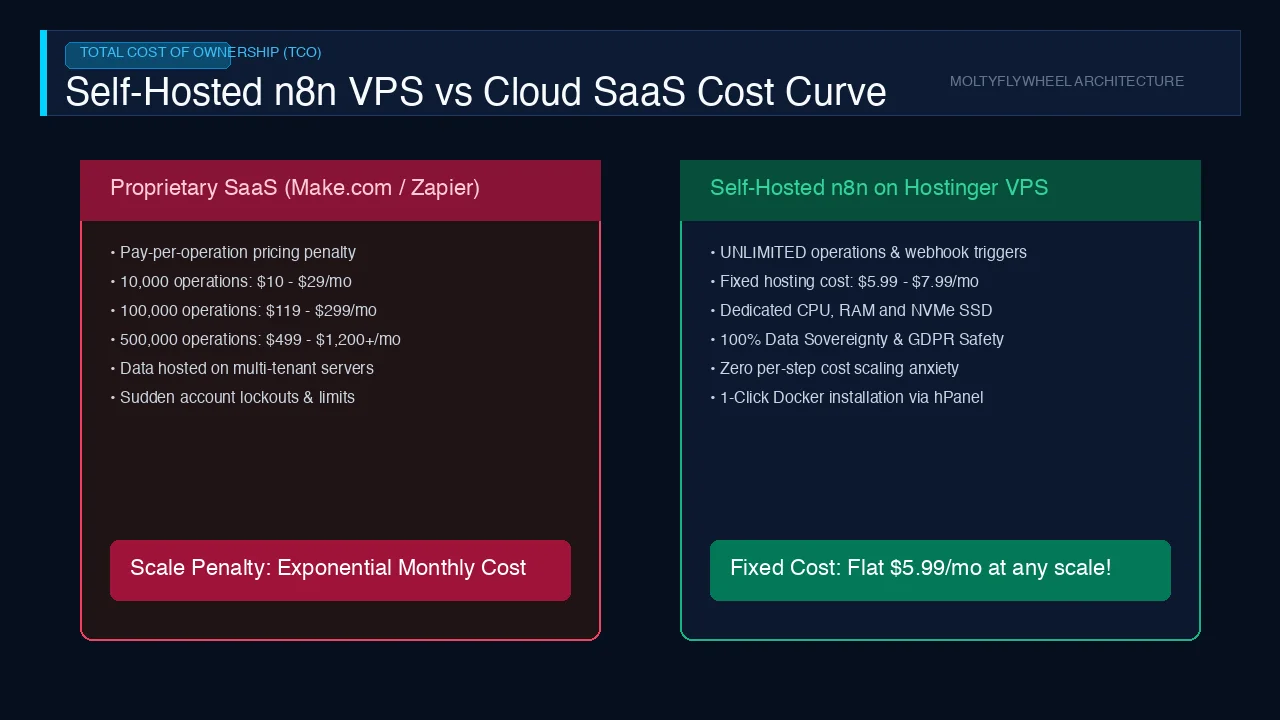
To understand where the financial crossover point occurs, examine real-world operational tiers across a 12-month operating window:
| Monthly Task Volume | Zapier (Professional) | Make (Pro Tier) | Self-Hosted n8n (Hostinger KVM 2) |
|---|---|---|---|
| 5,000 tasks/mo | ~$49 / month | ~$9 / month | ~$7.99 / month (Flat VPS fee) |
| 25,000 tasks/mo | ~$149 / month | ~$29 / month | ~$7.99 / month (Flat VPS fee) |
| 100,000 tasks/mo | ~$399 / month | ~$99 / month | ~$7.99 / month (Flat VPS fee) |
| 500,000 tasks/mo | ~$1,200+ / month | ~$299 / month | ~$14.99 / month (Hostinger KVM 4) |
| Data Privacy Control | Stored on Zapier Cloud | Stored on Make Cloud | 100% Owned on Your VPS |
| Execution Timeout Limit | Strict 30s timeout | Strict 40s timeout | Uncapped (Ideal for LLM streaming) |
The data proves that once an operator scales past 25,000 monthly tasks, self-hosting n8n ceases to be a marginal saving — it preserves thousands of dollars in operating capital every year.
Where Self-Hosted n8n on Hostinger VPS has the advantage
1. Zero marginal cost for high-frequency loops
Running an AI scraper that polls API endpoints every 60 seconds burns over 43,000 operations per month. On Zapier or Make, this single polling script costs $30 to $150 per month. On your Hostinger VPS, it consumes negligible CPU cycles on a flat-rate $8 server.
2. Complete data sovereignty and security
When syncing customer leads, banking webhooks, or proprietary CRM records, routing sensitive payloads through third-party SaaS clouds creates compliance liabilities. Running n8n on your Hostinger KVM node ensures data stays inside your private Docker network and PostgreSQL instance.
3. Execution endurance for generative AI
Cloud automation services enforce rigid 30-to-40-second execution timeouts. When chaining LLM calls (such as summarizing a 50-page PDF with Claude 3.5 Sonnet or running an iterative reasoning loop), cloud tasks abort mid-stream. On self-hosted n8n, execution timeouts are fully configurable.
Where Make and Zapier have the advantage
1. Zero DevOps maintenance
Self-hosting requires someone to provision the server, manage Linux security patches, and configure SSL certificates. Make and Zapier handle server infrastructure, database clustering, and automatic uptime failover seamlessly behind the scenes.
2. Managed OAuth authentications
Connecting services like Google Workspace, Meta Business Suite, and HubSpot on Make or Zapier takes one click. On self-hosted n8n, you must generate custom OAuth App credentials within the Google Cloud Console or Meta Developer Portal.
3. Visual error debugging
Make’s visual execution graph remains the gold standard for spotting exactly which node failed in a complex branch.
A practical routing framework for operators
Use this decision matrix to determine which infrastructure path fits your team:
                      [ Monthly Execution Volume? ]
                                   │
              ┌────────────────────┴────────────────────┐
       < 10,000 tasks/mo                        > 25,000 tasks/mo
              │                                         │
    [ Need rapid setup? ]                     [ Technical comfort? ]
       ┌──────┴──────┐                           ┌──────┴──────┐
      YES            NO                         YES            NO
       │              │                          │              │
    [ Make ]     [ Make Free ]           [ Hostinger VPS ]   [ Make Pro ]
+ Self-Hosted n8n- Choose Zapier only if: You operate inside a corporate environment that forbids self-managed servers, and you depend strictly on niche enterprise integrations not supported elsewhere.
- Choose Make if: You want a visual workflow builder with minimal maintenance and your volume stays below 20,000 operations monthly.
- Choose Hostinger VPS + n8n if: You are an AI operator, technical marketer, or agency running heavy automated pipelines, processing vector embeddings, and demanding absolute control over your cost structure.
Frequently Asked Questions
Is self-hosting n8n difficult for non-engineers?
It requires basic familiarity with terminal commands. Using Hostinger KVM VPS running Ubuntu 22.04, deploying Docker and n8n takes roughly 15 to 20 minutes using standard Docker Compose templates. Hostinger’s integrated hPanel and AI Assistant simplify initial SSH and firewall configuration.
Does n8n offer all the integrations that Make and Zapier provide?
n8n features over 400 native community nodes covering all major platforms (OpenAI, Anthropic, Telegram, Slack, Notion, Postgres, HubSpot). For unsupported APIs, n8n’s native HTTP Request node can connect to any REST or GraphQL endpoint effortlessly.
How much RAM is required to run n8n on a VPS?
A baseline n8n instance with PostgreSQL requires approximately 1.5 to 2 GB of RAM. For smooth production performance alongside vector databases like Qdrant, we recommend the Hostinger KVM 2 tier featuring 8 GB of dedicated RAM.
How can I claim the official partner discount for Hostinger?
You can access exclusive partner pricing through our verified gateway using the referral code TVTAGENCY at checkout, unlocking up to 80% off multi-year server commitments backed by Hostinger’s 30-day money-back guarantee.
Ready to Eliminate the Task Tax from Your Automation Stack?
Deploy your own high-performance automation engine with dedicated compute resources and zero operational limits.
What You Unlock with Hostinger KVM:
- Dedicated AMD EPYC CPU cores and ultra-fast NVMe SSD storage.
- Datacenter selection across Singapore, the US, and Europe for minimal latency.
- Full Docker compatibility with pre-built deployment templates.
👉 Claim Your Official Hostinger Partner Discount with Code TVTAGENCY