
Backing up an AI content pipeline means preserving enough information to restore a usable publishing process. A folder of Markdown files is valuable, but it may omit images, schedules, workflow definitions, approval records, and the configuration needed to connect them. Recovery fails when those dependencies are discovered only after an incident.
Quick Answer: Inventory content, assets, scheduling state, workflow configuration, and protected credentials. Back them up through appropriate separate mechanisms, then restore a sample in an isolated environment with publishing disabled. Judge the backup by a successful recovery drill, not the presence of archive files.
This tutorial is a proposed recovery procedure for a small content operation. It is not a report of a completed restore or a guarantee of zero data loss. The correct backup method depends on your storage, hosting, and workflow platform.
Back up and restore the whole content pipeline
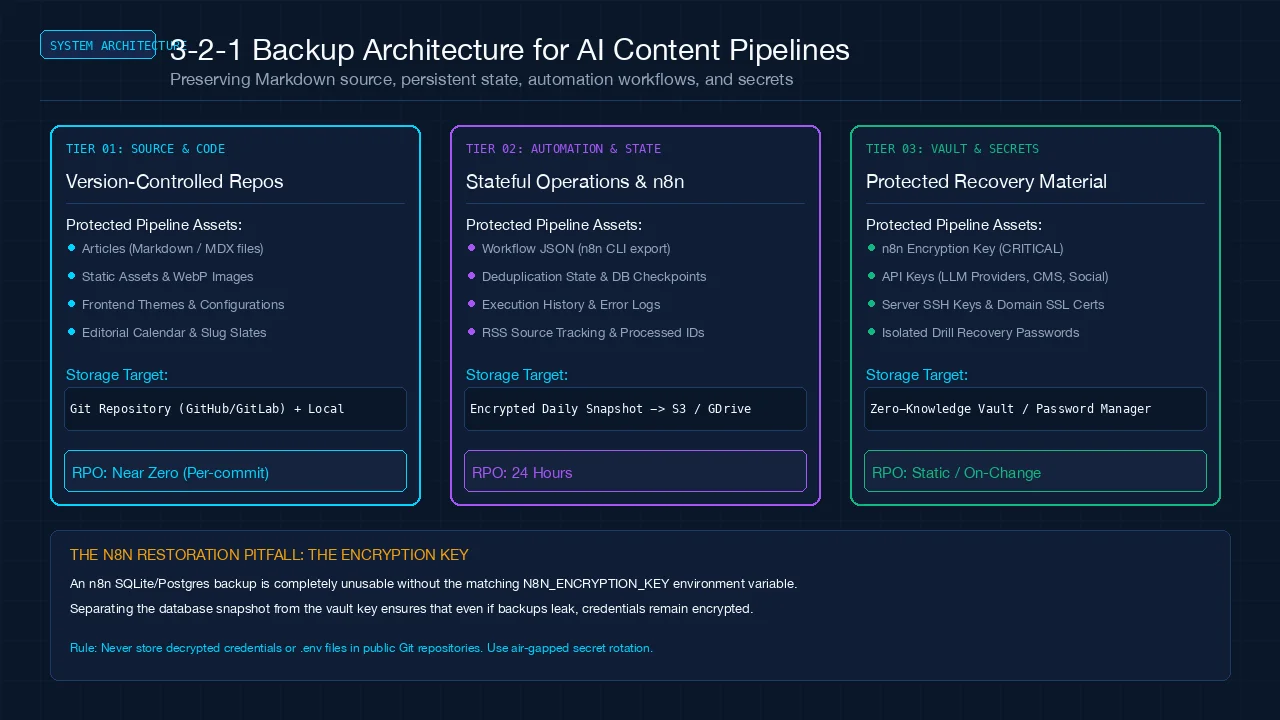 Figure 1: Comprehensive 3-2-1 pipeline backup architecture: version-controlled content, stateful automation checkpoints, and zero-knowledge secret vaults.
Begin with an asset map. For each component, record where it lives, who owns it, how it is backed up, and what depends on it. Do this before choosing an archive schedule so you know which components must be recoverable together.
| Component | What to preserve | Recovery check |
|---|---|---|
| Articles and metadata | Source files, dates, slugs, draft state | Article renders with correct metadata |
| Images and downloads | Original or publication-ready assets | Referenced files exist and open |
| Editorial calendar | Planned dates, slots, ownership | Correct next item can be identified |
| Review records | Approved revision and unresolved issues | Release decision remains traceable |
| Workflow definitions | Triggers, steps, routing, version | Workflow can be inspected without running |
| Persistent workflow state | Item IDs, deduplication records, checkpoints | Retry does not create duplicate work |
| Runtime configuration | Dependency versions and deployment configuration | Build works in the recovery environment |
| Credentials and encryption material | Protected, separately controlled recovery material | Authorized connections can be restored safely |
The RSS-to-draft workflow shows why persistent item records matter. Restoring prose without restoring duplicate checks can cause a recovered system to process the same source items again.
Choose recovery objectives before backup frequency
Define how much recent work you can afford to recreate and how long the process can remain unavailable. These are planning limits, not promises. A weekly article operation may tolerate a different interruption from a newsroom or a system delivering client work.
For example, if losing one day of draft changes would be unacceptable, a weekly-only backup does not match the objective. If recovery must finish within a working morning, discovering every dependency from scratch during that morning is unlikely to fit the plan.
Write down the assumptions behind the objective: whether a second operator is available, whether provider access can be recovered, and whether you have a clean machine or environment. Test against those assumptions rather than the ideal conditions of the original author.
Separate version history from independent recovery copies
A repository provides useful history for tracked content and configuration. It does not automatically protect ignored files, external databases, local-only images, account settings, or material stored in a separate service. Verify what is actually included instead of assuming the whole project is covered.
Keep an independent recovery copy with access controls appropriate to the content. Avoid making every copy depend on the same device and account. If an accidental deletion or account problem affects all copies together, duplication alone has not provided much resilience.
Record a manifest containing the snapshot time, included components, versions, and integrity checks where available. A manifest helps the restorer identify whether an article and its referenced assets belong to the same recovery point.
Export workflows without exposing credentials
For self-hosted n8n, the CLI documentation describes workflow and credential export/import operations. It also documents entity export/import for migrations. Choose the mechanism that covers the state you need; a workflow definition alone is not a complete database backup.
The encryption key documentation explains that n8n uses an encryption key to protect credentials. Include the required key in a protected recovery process separate from a public code repository. A database or encrypted credential export without the necessary key may not restore usable connections.
Do not put plaintext credentials in an editorial archive or demonstration file. If an export mode can produce decrypted credentials, avoid using it for routine content backups. Document who can access the protected material and how an authorized restorer obtains it.
Run an isolated restore drill
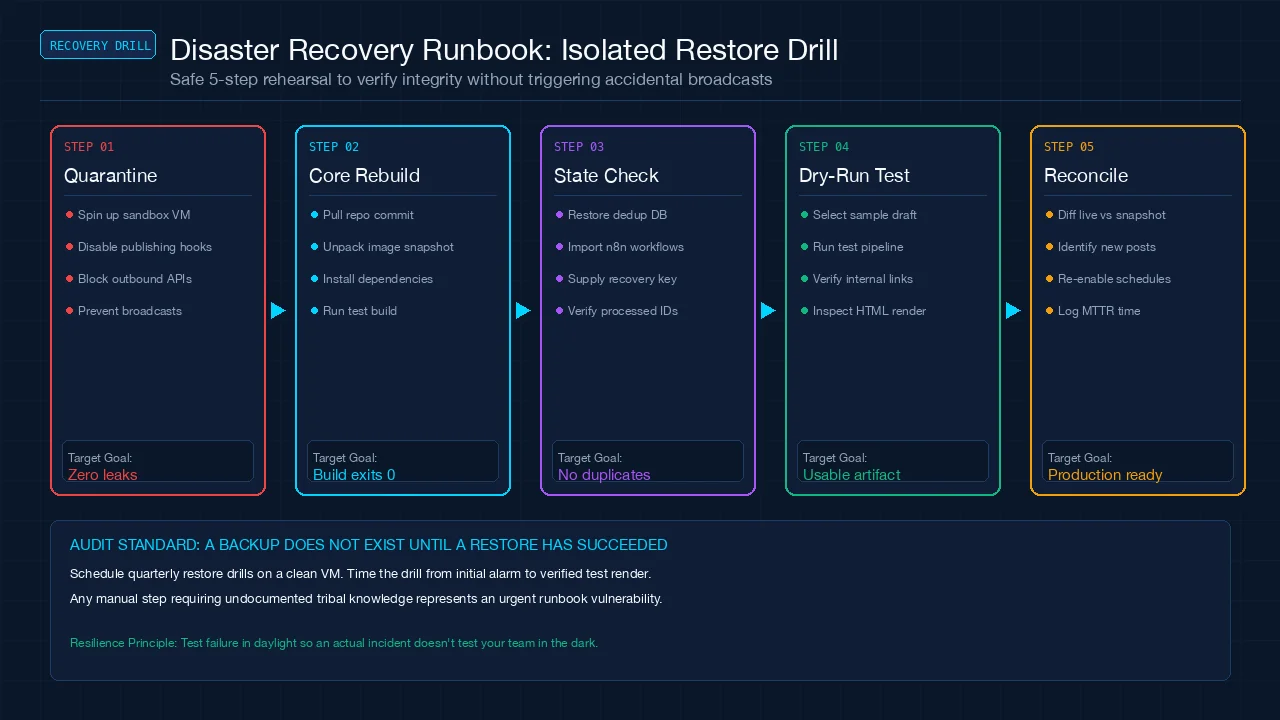 Figure 2: Five-step isolated disaster recovery runbook: quarantining external webhooks, restoring states, dry-run testing, and reconciliation.
Choose a representative article with an image, internal links, and a scheduled or reviewed state. Restore it from a selected snapshot into an isolated environment. Disable publication schedules, outbound messages, and production write connections before loading workflow state.
Verify the article source, image, metadata, and links. Build or render it using the recorded runtime configuration. If a dependency cannot be restored, record the exact missing component rather than substituting a live production connection without review.
Next inspect the workflow definition and persistent state. Confirm that the article is not accidentally queued for another publication and that previously processed source items remain identifiable. The restored process should know what work already happened.
Only reconnect necessary test services after inspecting configuration. A restored workflow may retain triggers that were appropriate in production but unsafe in a drill. Keep the test environment visibly distinct so an operator does not confuse a rehearsal with a release.
Measure recovery, including the awkward parts
Start the clock when the restorer begins following the procedure, not after all the archives and credentials have already been assembled. Record time spent locating files, obtaining authorized access, installing dependencies, and resolving inconsistencies.
Use a drill record with snapshot ID, scenario, start time, completion time, missing components, integrity checks, and unresolved questions. The accepted outcome should be a usable, inspected artifact and an understood workflow state, not simply a process that exited without an error.
If a file is missing, investigate whether it was excluded, never backed up, or saved after the chosen snapshot. Each cause requires a different fix. Increasing backup frequency will not solve a permanently excluded asset directory.
The silent pipeline failure case study reinforces the distinction between successful execution and the expected outcome. Apply the same standard to recovery jobs.
Reconcile before resuming publication
After a real recovery, compare the restored calendar and content with the current live site. Some articles may have published after the snapshot; others may have changed. Do not rerun the entire queue without identifying those differences.
For each scheduled item, decide whether to leave it, recreate a missing draft, update the restored state, or request editorial review. Preserve the public URL of an existing article unless there is a deliberate migration plan. Recovery should not create duplicate pages merely because their original local records were missing.
Resume one controlled action first, verify the result, and then restore the normal schedule. Keep the previous recovery point until the process is known to be usable. A successful first action is evidence of progress, not proof that every dependency has been tested.
Recovery checklist
- Inventory source files, assets, state, and external dependencies.
- Define acceptable work loss and restoration time.
- Verify ignored and external material is covered separately.
- Protect credentials and encryption material outside public archives.
- Restore a representative sample with publication disabled.
- Check rendering, links, approvals, and duplicate prevention.
- Record missing components and measured recovery time.
- Reconcile restored state with the live site before resuming.
Frequently Asked Questions
Is a Git repository enough?
Only if all required recovery material is actually tracked and available, which many pipelines do not satisfy. Inspect images, ignored configuration, databases, and external services separately.
Does syncing a folder count as a backup?
It may provide another copy, but deletions or corrupted changes can propagate. Check version retention and independent recovery options rather than treating synchronization as proof of recoverability.
Should credentials live with article backups?
Keep them in a protected recovery process with appropriate access controls. Content reviewers generally do not need production secrets, and a public repository must not become a credential archive.
How often should I rehearse recovery?
Choose a cadence based on changes and the cost of interruption. Rehearse after meaningful changes to storage, credentials, runtime, or workflow state, and periodically verify that the documented procedure still works.
Make recovery part of the operating process
Use the Make program page when comparing managed orchestration options, but verify its recovery capabilities separately. The AI tool evaluation scorecard can help treat export and recovery effort as part of the purchase decision.