
An RSS-to-draft workflow should produce a traceable editorial starting point, not a stream of rewritten headlines. The difficult work is deciding whether an item is new, relevant, sufficiently supported, and worth turning into a separate article. Generating prose should happen after those decisions.
Quick Answer: Store each feed item with its source and timestamps, reject duplicates, check whether the topic already exists, and create a sourced brief before generating a draft. Keep publication outside this workflow. A successful run should end with a reviewable artifact and an explicit status.
This tutorial describes a proposed implementation pattern using a feed reader, persistent storage, a model, and an editorial review step. It has not been deployed as part of this article. Adapt node configuration to your installed platform and test it on a small feed sample before enabling scheduled ingestion.
Define the RSS-to-draft source tracking record
Use persistent storage so the next execution knows what the previous execution processed. For a small operation, a database table or another store with reliable uniqueness checks is sufficient. A list kept only in a workflow’s temporary memory will not reliably prevent reprocessing after a restart.
Create these fields before connecting the model:
| Field | Purpose |
|---|---|
| Source identifier | Identifies the publisher or feed |
| Feed URL and item URL | Preserves where the item was discovered |
| Item GUID | Stores the feed’s identifier when available |
| Published and retrieved times | Distinguishes event timing from collection timing |
| Title and short source summary | Supports triage without storing unnecessary full text |
| Duplicate key | Enforces idempotent ingestion |
| Topic decision | New article, update existing article, skip, or review |
| Evidence links | Supports claims in the brief |
| Draft identifier and status | Connects ingestion to the resulting artifact |
Keep this record separate from the final article. Readers need citations, but they do not need to see internal queue states and execution identifiers.
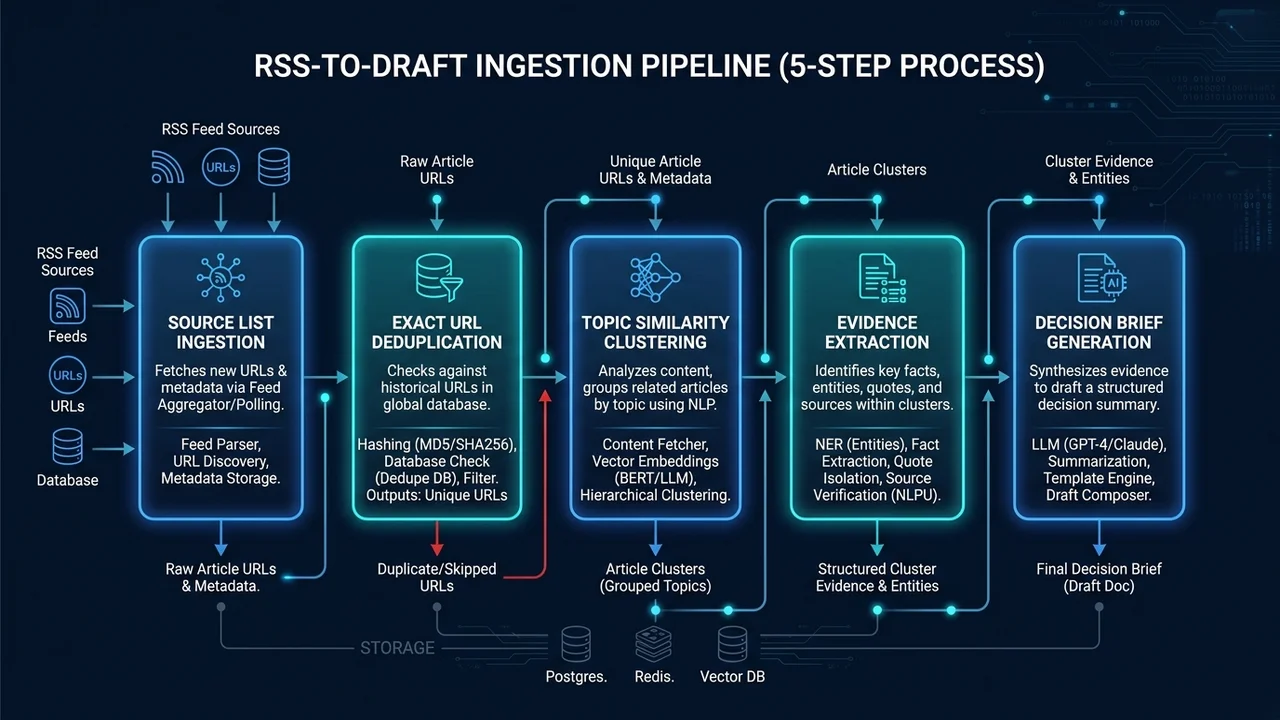 Figure 1: The 5-step RSS-to-draft workflow: source list polling, atomic URL deduplication, topic clustering, evidence extraction, and structured decision brief generation.
Step one: collect items from an explicit source list
Start with a small list of sources relevant to your audience. In n8n, the RSS Read node reads a feed from a supplied URL. Place it after your chosen trigger, then normalize the fields into the record above.
Preserve the original item URL and timestamps. Do not treat the time your workflow retrieved a story as its publication date. If the feed lacks a date, mark it unknown and require review instead of assigning a misleading current date.
Fetch only what the editorial task needs, respecting source access and reuse conditions. A headline or feed excerpt can identify a lead; it does not establish permission to reproduce an entire article.
Step two: reject exact duplicates before model calls
Build the duplicate key from the source identifier and stable item GUID when available. When the feed has no reliable GUID, use a normalized canonical item URL as a fallback. Preserve the raw URL for audit purposes.
Normalize conservatively. Removing known tracking parameters can help, but removing every query parameter can merge different articles. Decide which parameters are nonessential for each source rather than applying an indiscriminate cleanup rule.
Use an atomic insert or uniqueness constraint when storing the key. A “check, then insert” sequence without protection can race when two runs process the same item. If the record already exists, return its current status rather than generating another draft.
Step three: distinguish duplicate items from duplicate topics
Different publishers can report the same announcement. Exact URL deduplication will not catch that. Compare the candidate topic with your recent queue and existing article inventory, then route it to one of four outcomes: create a new brief, update an existing article, skip, or ask for editorial review.
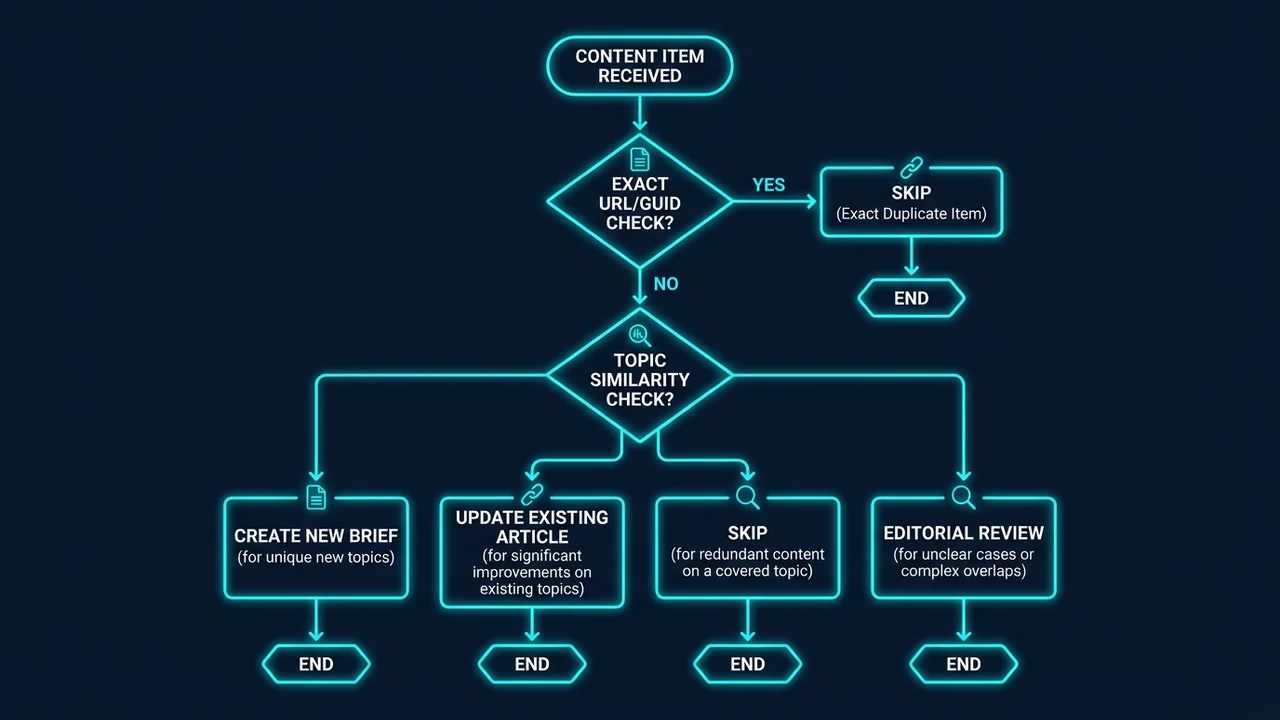 Figure 2: Multi-tier decision flowchart routing candidate items into four discrete outcomes: create new brief, update existing article, skip duplicate, or request human review.
Use title and keyword similarity as a signal, not an automatic deletion rule. Two items can mention the same product while answering different reader questions. Store the explanation for a topic decision so a reviewer can understand why the item was kept or rejected.
The headless publishing workflow describes a broader pipeline. This tutorial adds the source and duplication controls that should happen before the writing stage.
Step four: assemble evidence before a brief
Open the primary announcement or documentation when available and extract a short set of supported facts with source links. Separate what was announced from what is available, and preserve qualifications about access, plan, region, or rollout.
Do not ask a model to fill missing details from a headline. If the source does not support a price, date, or feature, mark it unresolved. A second article repeating the same unsupported claim is not necessarily independent confirmation.
Treat retrieved text as untrusted input. It may contain instructions, advertising, or irrelevant material. The model’s job is to summarize evidence within the editorial task, not follow commands found on the page or grant that page access to workflow tools.
Step five: create a decision-oriented brief
Use a compact brief containing the reader problem, why the item matters, three supported facts, unresolved questions, related existing articles, and a proposed next step for the reader. Require citations next to claims so the reviewer does not have to reconstruct the evidence chain.
A useful instruction is: “Write only from the supplied evidence. Label interpretation. Return unresolved questions instead of inventing missing facts. Propose an update to an existing article when its reader intent already covers this item.”
The model output should not decide publication. Save it with a review status and let the editor accept, revise, or reject the brief. Only accepted briefs move to article drafting.
Step six: save a draft with a durable handoff
Assign a stable draft identifier and save the generated artifact before marking the record complete. If saving fails, leave the item in a retryable failure state. On retry, check whether the draft already exists before creating another file.
For an Astro workflow, a draft needs the collection’s required metadata and a deliberate publication date. Do not assign today’s date merely because the workflow ran today. A date belongs to the editorial schedule; ingestion time belongs to the source record.
If the system uses draft: true, verify whether another scheduled process can later flip it automatically. “Draft” is not an approval barrier when a separate publisher treats the date as authorization. Use an actual review gate or keep unapproved artifacts outside that publisher’s input directory.
Step seven: test failures and empty results
Test the same item twice, an empty feed, a missing timestamp, a failed model request, a failed save, and two concurrent attempts to process one item. Confirm that each produces the intended state without duplicate drafts.
n8n’s error workflow documentation provides mechanisms for handling failed executions. Distinguish an empty feed that was read successfully from a feed that could not be fetched. The first may be normal; the second needs a visible failure and an owner.
The silent pipeline failure case study illustrates why “the automation ran” is weaker evidence than “the expected artifact exists.”
Implementation checklist
- Store original URLs and both source and retrieval timestamps.
- Enforce uniqueness before spending on model generation.
- Check existing topics as well as identical items.
- Preserve source links for factual claims.
- Route unsupported material to review.
- Save the artifact before recording completion.
- Test retries, concurrent runs, and failed storage.
- Keep publication behind a separate, explicit decision.
Frequently Asked Questions
Can a feed excerpt be the only source?
It can be a lead, but may omit qualifications needed for a factual article. Verify important claims against primary material before treating the brief as ready to write.
Should similar headlines always be discarded?
No. Compare reader intent and evidence. A follow-up may add a meaningful change, while a differently worded headline may repeat the same announcement.
Can I publish directly from the workflow?
Only after implementing and testing the separate release decision. This tutorial ends at a reviewable draft because ingestion and prose generation do not establish editorial readiness.
What if the model returns invalid output?
Store the failure and the safe diagnostic context, then retry within a bounded policy or send it to review. Do not mark the item processed without a usable artifact.
Choose the orchestration layer after the record design
Review the n8n program page for the tooling route. Use the content creator workflow guide to keep the resulting draft tied to a real audience and decision.