If you look at DeepSeek Harness only as a local testing utility for hobbyists, you will miss the architectural leverage that actually matters for production engineering.
The real question is how engineering teams and growing enterprises can run an autonomous, secure AI agent runtime without surrendering proprietary data or paying unbounded token markups to proprietary cloud APIs.
Quick Answer: Setting up deepseek harness hostinger vps infrastructure gives operational teams a self-hosted, modular AI agent development environment. By running DeepSeek Harness on a dedicated Hostinger KVM VPS, businesses decouple agent orchestration from closed cloud APIs, enforce strict local data privacy compliant with data sovereignty regulations, and achieve up to 91% token cost reduction through intelligent System 1 and System 2 routing.
Why deploy deepseek harness on hostinger vps
Deploying an autonomous AI agent runtime requires predictability across three core pillars: memory allocation, network latency, and operational cost. Running agent frameworks on shared consumer cloud platforms introduces rate limits, unpredictable cold starts, and escalating token bills.
Running DeepSeek Harness on a dedicated Virtual Private Server (VPS) from Hostinger resolves these constraints through four direct operational advantages:
- Isolated compute boundaries: Dedicated CPU cores and NVMe storage prevent resource contention during memory-intensive tool execution and vector embedding tasks.
- Node.js runtime compatibility: Hostinger VPS environments support clean installations of Node.js 22.19+, satisfying the runtime requirements of DeepSeek Harness without decompression bugs or timeout failures.
- Data sovereignty and compliance: All internal documents, customer interactions, and system telemetry stay on your private server, aligning with the Vietnam Personal Data Protection Decree (PDPD Decree 13/2023/ND-CP) and international privacy frameworks.
- Fixed infrastructure cost: Instead of variable per-seat charges or usage surcharges, teams pay a predictable monthly hosting baseline while routing inference through cost-optimized endpoints.
Core architectural components of deepseek harness
DeepSeek Harness operates on an explicit “Everything is a Plugin” philosophy. Unlike monolithic agent wrappers that bind tool execution to specific proprietary models, DeepSeek Harness isolates runtime execution from model inference.
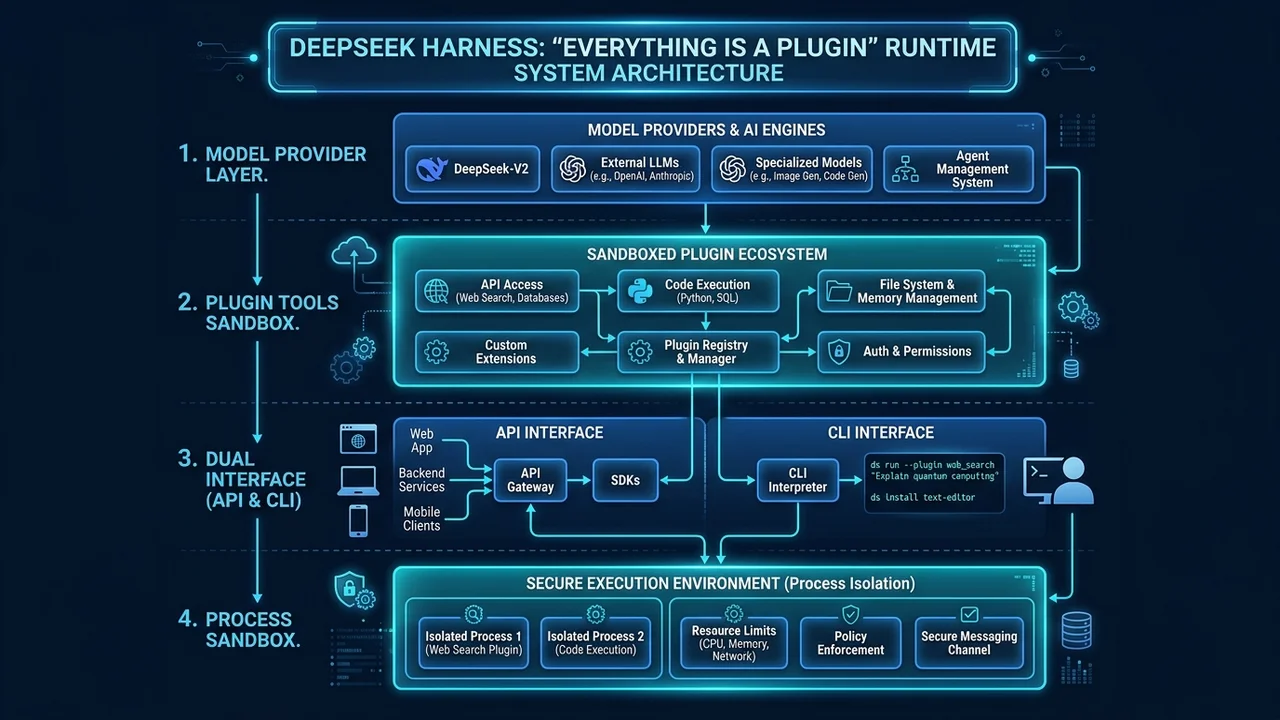
The runtime architecture consists of four distinct layers:
Model provider layer
The runtime interfaces with local and remote language models through standardized API connectors. Operators can switch between DeepSeek V4 Flash, DeepSeek V4 Pro, or local models running via Ollama without modifying agent logic or tool signatures.
Replaceable tool plugins
File system operations, web scrapers, database connectors, and external API gateways exist as modular plugins. Each plugin registers explicit input and output schemas, allowing validation layers to intercept faulty payloads before execution.
Dual-mode interface
The platform provides both a browser-based Web UI for interactive human-in-the-loop debugging and a headless CLI for automated cron jobs, webhooks, and CI/CD pipelines.
Process isolation sandbox
Agent sessions run in sandboxed execution contexts. System mutations, temporary files, and shell commands remain compartmentalized, preventing accidental side effects across client environments.
Cost comparison: deepseek harness on hostinger vps vs cloud alternatives
Evaluating agent infrastructure requires analyzing both fixed host costs and variable token expenditures over time.
| Dimension | Hostinger VPS (Recommended) | Proprietary Cloud Agent Platforms | Generic Bare-Metal Server |
|---|---|---|---|
| Baseline Monthly Cost | Fixed ($5.99–$14.99/mo) | Variable ($20–$100+/seat/mo) | High ($80–$250+/mo) |
| Token Cost Optimization | 91% reduction via local gateway | None (locked to vendor prices) | Manual configuration needed |
| Data Sovereignty | 100% tenant-controlled | Hosted on third-party servers | 100% tenant-controlled |
| Setup Time | 15–25 minutes | 5 minutes | 2–4 hours |
| Environment Control | Full root access on KVM VPS | Sandboxed web UI only | Full hardware control |
| Vietnamese Support | 24/7 localized support | English-only ticketing | Self-managed |
| Money-Back Guarantee | 30-day money-back guarantee | Rarely offered | None |
Production data from enterprise deployment battle log BATTLE-LOG-02 demonstrates that pairing self-hosted agent orchestration with a dual-engine architecture cuts token spending by 91%. By offloading routine intent classification and validation to lightweight System 1 models at $0.042 per million tokens, expensive System 2 reasoning calls are reserved strictly for complex analysis.
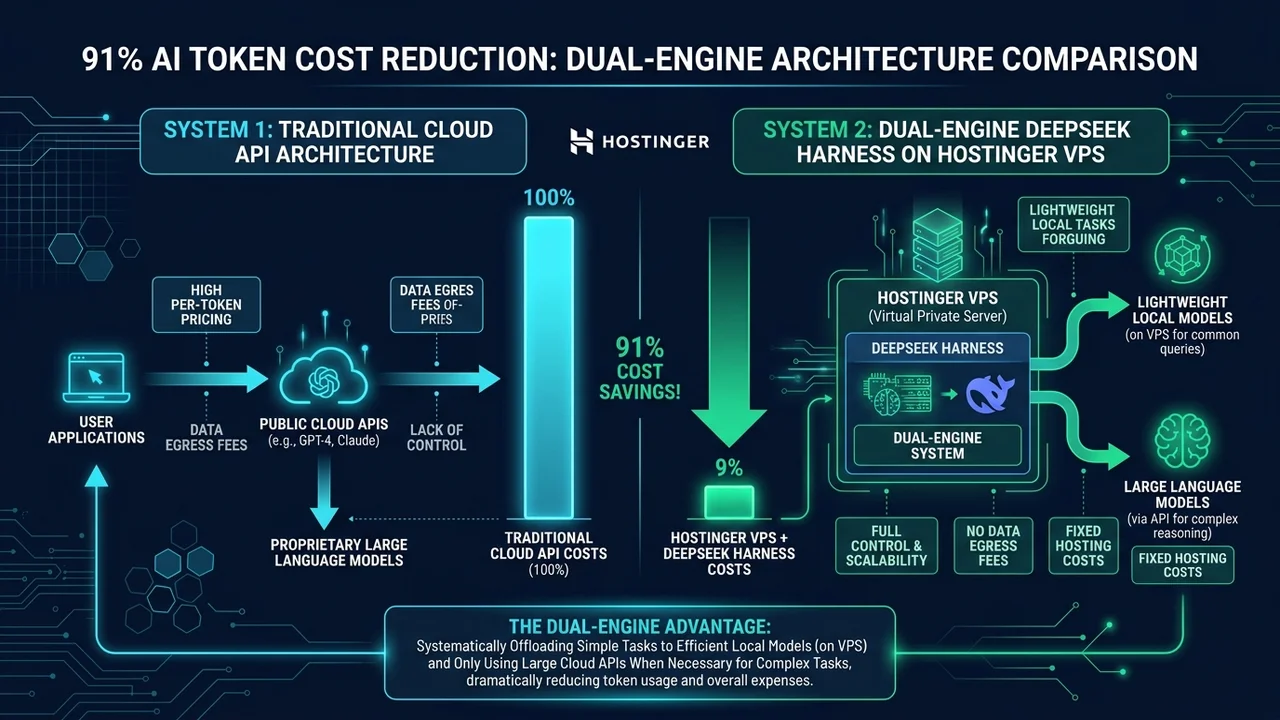
To explore how dual-engine routing functions in real-world systems, see our technical breakdown of the Dual-Engine System 1 and System 2 Architecture for AI Agents.
Deploying deepseek harness on hostinger vps step by step
Setting up a production-ready environment requires four structured steps. Follow this procedure on a fresh Hostinger KVM VPS instance running Ubuntu 22.04 LTS.
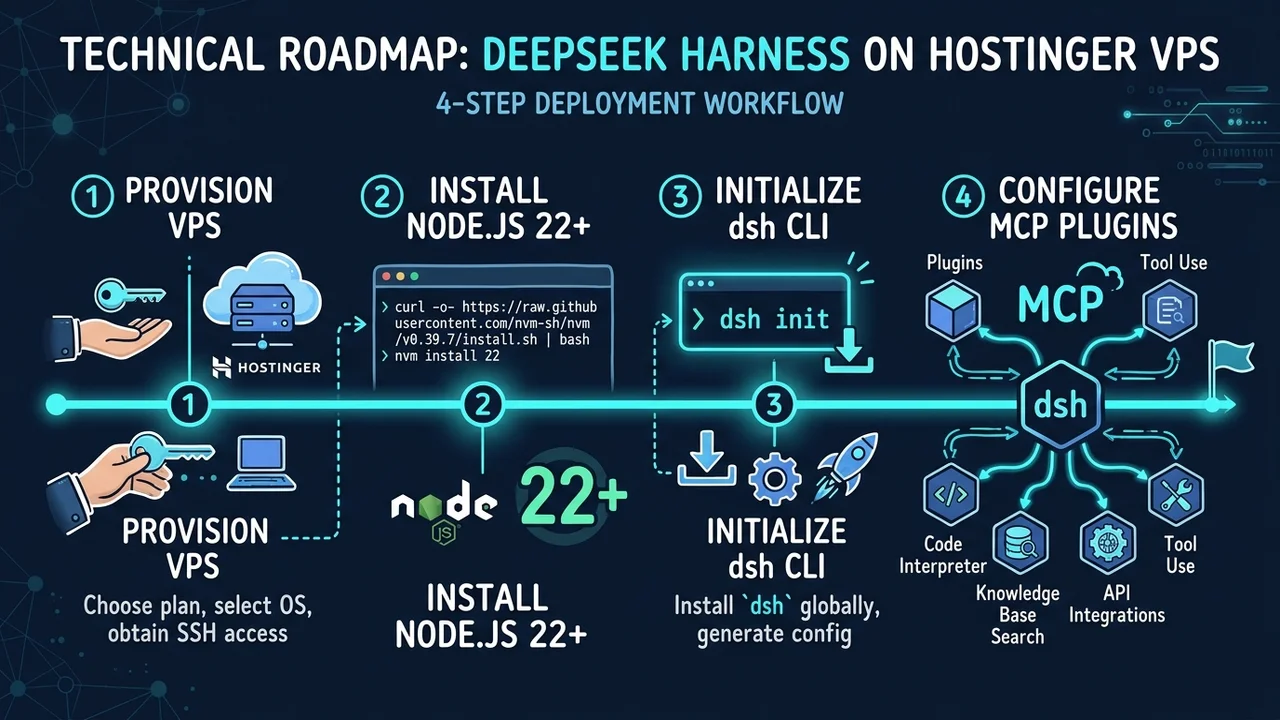
Step 1: Provision your Hostinger VPS instance
Sign up for a KVM VPS instance through Hostinger VPS. For production workloads running multiple plugins and agent sessions, choose the KVM 2 plan (2 vCPU cores, 8 GB RAM, 100 GB NVMe disk space) or higher.
Select Ubuntu 22.04 LTS as your base operating system, configure SSH keys for secure remote access, and note your server IP address from the Hostinger hPanel dashboard.
Step 2: Configure the system and Node.js runtime
Establish an SSH connection to your server and update system packages. Install Node.js 22.x from the official NodeSource repository to ensure runtime stability:
# Update base repositories and existing packages
sudo apt update && sudo apt upgrade -y

# Add NodeSource repository for Node.js 22.x
curl -fsSL https://deb.nodesource.com/setup_22.x | sudo -E bash -

# Install Node.js and build essentials
sudo apt-get install -y nodejs build-essential git

# Verify installed versions
node --version # Must output v22.19.0 or higher
npm --version
Step 3: Install and initialize DeepSeek Harness
Install the DeepSeek Harness CLI globally and verify the installation:
# Install DeepSeek Harness package globally
npm install -g @deepseek-ai/dsh

# Verify CLI availability
dsh --version

# Initialize default configuration
dsh init
To launch the web interface bound to localhost, execute:
# Launch interactive agent interface
dsh web --port 3080 --host 127.0.0.1
For production environments, place the service behind an Nginx reverse proxy secured with Let’s Encrypt SSL certificates.
Step 4: Configure tool plugins and model endpoints
Open your configuration file at ~/.dsh/settings.yaml to specify model backends and tool plugins. For local service orchestration, integrate external MCP servers directly into your harness:
models:
  default: "deepseek-coder"
  providers:
    deepseek:
      apiKey: "${DEEPSEEK_API_KEY}"
      baseUrl: "https://api.deepseek.com/v1"

mcpServers:
  filesystem:
    command: "npx"
    args: ["-y", "@modelcontextprotocol/server-filesystem", "/home/developer/workspace"]
  webSearch:
    command: "npx"
    args: ["-y", "@modelcontextprotocol/server-brave-search"]
    env:
      BRAVE_API_KEY: "${BRAVE_API_KEY}"
For broader infrastructure patterns, review our guide to building an AI Business OS: Operational Framework for Modern Teams.
Practical use cases for growing businesses
Self-hosting an agent harness unlocks three immediate high-value automation scenarios without leaking sensitive commercial data.
Secure customer intelligence workflows
Customer support tickets and CRM records often contain personal identifiable information (PII). Instead of passing raw customer records to public cloud APIs, a self-hosted agent on Hostinger VPS sanitizes incoming records locally, queries an on-premises SQLite or PostgreSQL database, and formats structured response drafts for customer service agents.
Automated research and multi-channel publishing
Marketing and editorial teams can schedule autonomous agents to monitor industry news feeds, analyze competitor updates, and draft initial content summaries. Because tool plugins run directly in your server environment, agents can save structured assets to local Markdown repositories, trigger static site builds, and notify team members via internal messaging hooks.
For a curated collection of verified marketing pipelines and platforms, explore our directory of affiliate tools and automation resources for content creators.
Autonomous code review and developer tooling
Engineering teams can integrate DeepSeek Harness into their local Git workflow. Agents inspect pull requests, run automated linting and test suites, highlight potential security regressions, and propose targeted patches before code reaches production branches.
Honest limitations and operational trade-offs
While running DeepSeek Harness on Hostinger VPS provides significant autonomy and cost control, operators must evaluate four real-world engineering trade-offs:
- Absence of dedicated server-side GPU: Standard KVM VPS plans rely on CPU compute. Running local frontier models (such as 70B parameter models) directly on the VPS CPU is impractical. The recommended architecture uses the VPS for runtime orchestration and lightweight routing models, while delegating heavy reasoning to external API endpoints.
- Maintenance responsibility: Unlike fully managed SaaS platforms, a self-hosted VPS requires regular OS updates, security patching, SSH hardening, and manual backup configuration.
- Memory thresholds on multi-agent execution: Running multiple concurrent agent sessions with browser automation plugins (such as headless Chromium) can quickly exhaust RAM on entry-level plans. A minimum of 8 GB RAM (KVM 2) is required for stable multi-session workloads.
- Cold start tool latency: Complex plugin chains that initialize separate Node.js child processes can introduce 1–3 seconds of latency before returning execution results.
💡 Operator Recommendation: Size the VPS for the agent workload you actually run today, not the one on the roadmap — you can scale the plan up later. Check the program details, then provision with the partner code:
Disclosure: Some links in this box are affiliate links. If you purchase through them, we earn a commission at no extra cost to you.
Frequently Asked Questions
What are the minimum server specifications to run DeepSeek Harness on Hostinger VPS?
DeepSeek Harness requires at least 1 vCPU and 2 GB RAM for basic CLI operations. However, for production workloads using the Web UI, multiple tool plugins, and concurrent task execution, we recommend Hostinger’s KVM 2 plan with 2 vCPUs, 8 GB RAM, and NVMe storage.
Can DeepSeek Harness run completely offline without external API keys?
Yes. If your VPS has sufficient RAM to run local quantized models via Ollama (such as Qwen 2.5 Coder 7B or Llama 3.2), DeepSeek Harness can route prompts entirely to local endpoints. For heavy reasoning tasks, connecting API keys for DeepSeek V4 or Claude provides higher output quality while maintaining local orchestration control.
How does hosting on Hostinger VPS assist with data privacy compliance?
Hosting on your own private VPS keeps customer databases, agent transcripts, and file system interactions within your isolated instance. Data is not shared with third-party multi-tenant SaaS providers for model training, simplifying compliance with regulations such as Vietnam’s Personal Data Protection Decree (PDPD).
Why choose Hostinger VPS over generic cloud providers for AI agent workloads?
Hostinger KVM VPS instances provide dedicated virtualized hardware, high-speed NVMe drives, unmetered network bandwidth, and responsive 24/7 localized support at a competitive fixed monthly rate. The predictable pricing model protects growing teams from unexpected cloud billing spikes.
Can I connect external MCP servers to DeepSeek Harness on a VPS?
Yes. DeepSeek Harness natively supports the Model Context Protocol (MCP). You can configure file system, SQLite, web scraping, and API connectors directly in your configuration file, enabling agents to execute complex real-world workflows securely.
What happens if I need more server resources as my agent workflows expand?
Hostinger allows seamless, one-click VPS plan upgrades directly from the hPanel dashboard. You can scale CPU cores, RAM, and NVMe storage without reinstalling your operating system, losing configurations, or disrupting your DeepSeek Harness environment.
Ready to Build Your Autonomous AI Agent Infrastructure?
Deploying deepseek harness hostinger vps gives your team complete control over your AI runtime, eliminating vendor lock-in and slashing monthly token overhead.
Get started with Hostinger VPS today and build your private AI development platform with enterprise-grade reliability, backed by a 30-day money-back guarantee and 24/7 localized support.