
Human approval in an AI content workflow is useful only when the reviewer knows what decision they are making. A button labeled “approve” cannot repair missing sources, an unclear audience, or a draft that changes after review. The workflow needs to connect an identifiable person, a specific version, and a defined publication action.
Quick Answer: Review the brief before expensive production, inspect evidence and editorial claims before final formatting, and approve the exact version that will be published. Keep automation responsible for repeatable checks and routing. Make rework, expired approval, and failed publication visible states.
This is an original workflow design for a small editorial operation. It is not a claim that a particular platform provides all these controls automatically. You can implement the pattern with a document register, a repository, or a workflow tool, provided the state and ownership are explicit.
Design human approval around decisions
Begin by naming the irreversible or consequential action. For a blog, it is usually making a particular page public. For a newsletter, it is sending a particular version to an audience. Those actions should not share a vague approval record simply because the text is similar.
The AI content automation workflow guide covers the broader process. Approval adds a decision boundary to that process; it should not become a collection of notifications that everyone assumes someone else has handled.
Use one accountable reviewer for each gate. A small team may assign all gates to the same person, but the checks should remain distinct. Subject expertise, factual verification, and release readiness answer different questions.
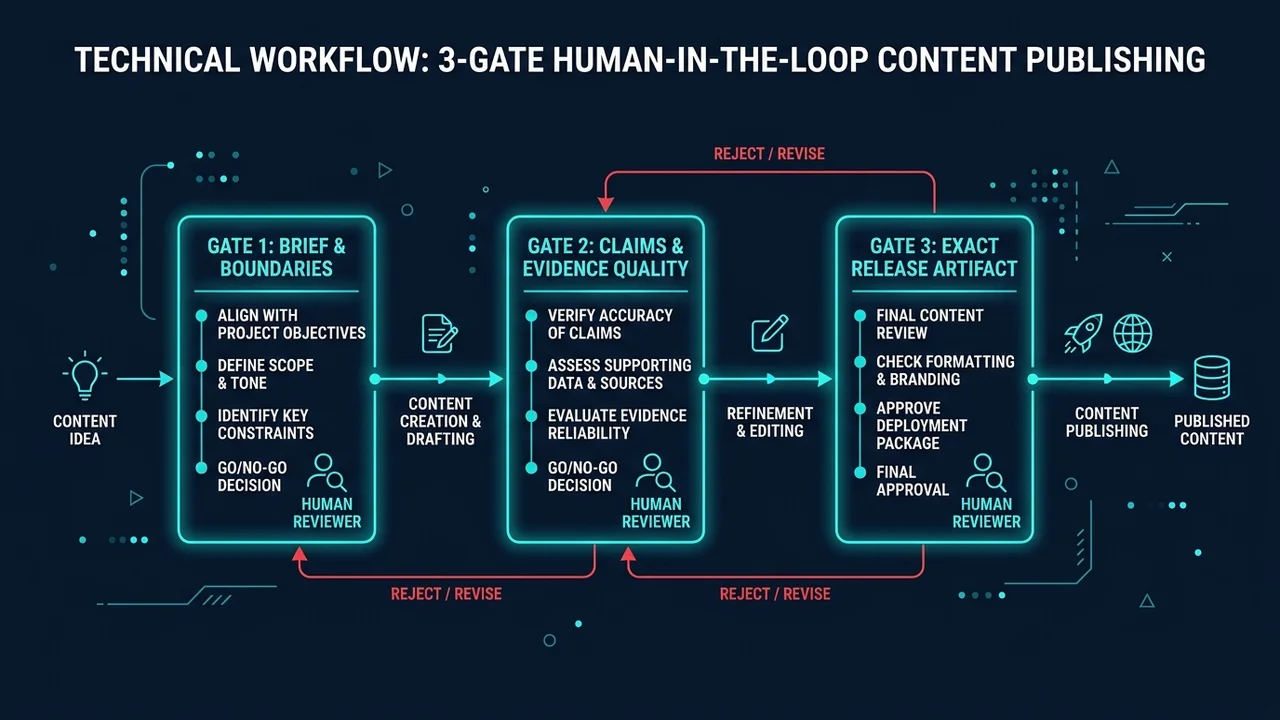 Figure 1: The 3-gate human review workflow: Gate 1 Brief & Scope, Gate 2 Claims & Evidence, and Gate 3 Exact Release Artifact.
Gate one: approve the brief and its boundaries
Review the reader, topic, angle, evidence requirements, and intended next step before generating a full article. This is the cheapest point to catch a topic that duplicates existing coverage or promises an answer the available evidence cannot support.
The brief should state what the article will not attempt to establish. A desk review can analyze public program terms; it cannot claim hands-on performance. A tutorial can describe a proposed workflow; it cannot report production reliability unless that reliability was measured.
Return a brief with a specific reason, such as “the audience is unclear” or “this comparison has no defined task.” Do not ask a writer to make it “more engaging” when the actual problem is missing evidence or an unsuitable topic.
Gate two: approve claims and editorial quality
Review the substance before polishing the layout. Ask whether each important factual statement has an appropriate source and whether the source supports the exact claim. A page about a product does not automatically support every feature or price attributed to it.
Separate evidence types in the draft: official documentation, direct observation, interpretation, and hypothetical illustration. A reviewer should be able to distinguish them without reconstructing the author’s research process. Record unresolved questions instead of allowing confident wording to conceal them.
Google’s people-first content guidance encourages clear sourcing and transparency about how content was produced. For an operational workflow, translate that into a review question: can a reader understand what was actually researched or tested?
Gate three: approve the exact release artifact
After corrections, create a version identifier for the article and its relevant assets. That might be a repository commit or a content revision ID. Store it with the reviewer, approval time, intended publication date, and destination.
If the text, main image, affiliate destination, or scheduled destination changes materially, invalidate the approval and send the new version back for review. Otherwise the system can publish something different from what the reviewer accepted.
Use this release card:
| Field | Example value or instruction |
|---|---|
| Article identifier | Stable slug or content ID |
| Approved revision | Commit or revision identifier |
| Reviewer | Named owner of the release decision |
| Destination | Exact site, channel, and path |
| Schedule | Date, time, and timezone |
| Evidence status | Verified, unresolved, or returned |
| Asset status | Present, licensed or authorized as needed, inspected |
| Next action | Publish, revise, or hold |
The card is a proposed record format. Do not use a fabricated revision value in production; it must identify the artifact your system will actually publish.
Make states explicit and transitions narrow
A useful state sequence is brief approved, drafting, review requested, revision required, approved for release, scheduled, publication attempted, and publication verified. A failed attempt returns to a visible failure state rather than silently becoming “done.”
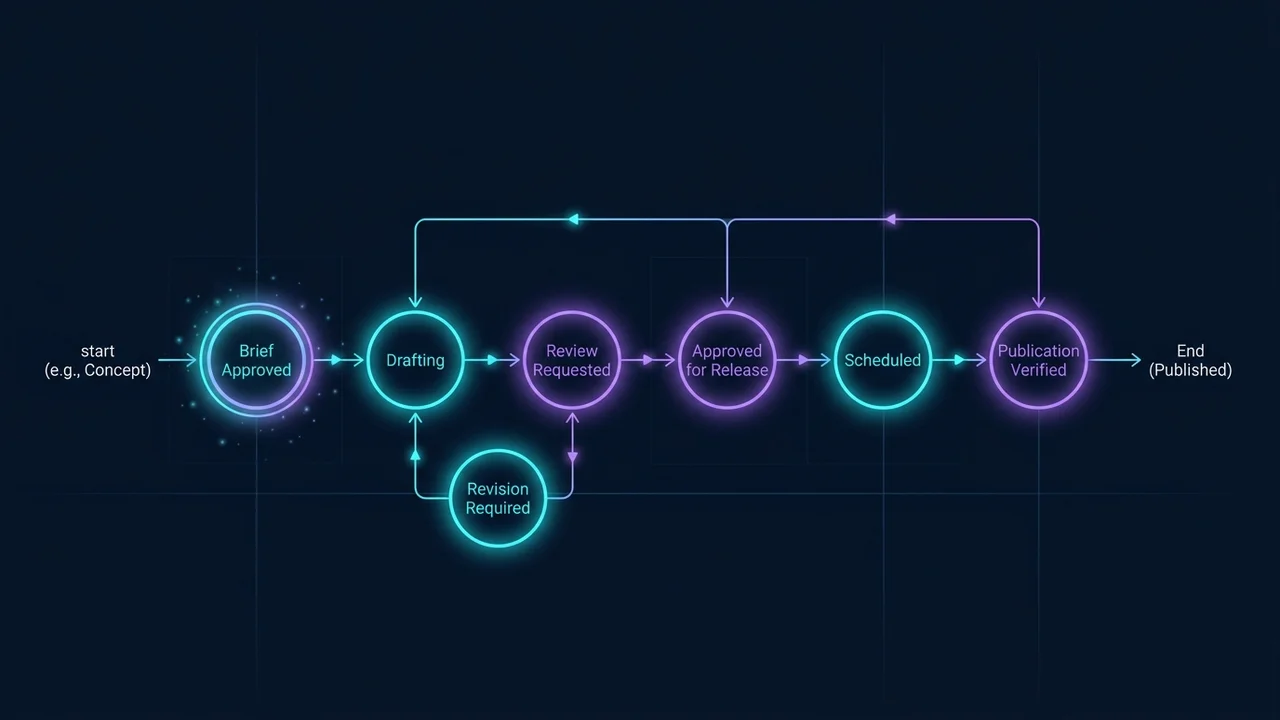 Figure 2: Finite state machine governing editorial approval transitions, ensuring failed states and revision loops are explicit.
Only the approval step should authorize the transition into release readiness. Passing a spelling check or a successful build should not grant editorial approval. Likewise, a reviewer approving the text should not bypass a broken-link check or a failed deployment.
For GitHub-based publishing, workflow trigger documentation describes event-driven execution. A trigger starts work; it is not evidence that the resulting article was reviewed or successfully delivered. Your approval and verification records must supply that information.
Automate mechanical checks without confusing them with judgment
Use automated checks for required fields, missing assets, malformed dates, duplicate slugs, and destinations that do not exist. Make the results available beside the draft so the reviewer does not spend time rediscovering simple failures.
Keep judgment questions with a person: whether the angle is useful, whether a claim overstates the evidence, whether the recommendation fits the audience, and whether the piece fairly explains trade-offs. A fluent text generator can assist this review but should not be the sole authority approving its own unsupported claims.
If your system uses n8n, its error handling documentation describes error workflows and deliberate failure signaling. Use those mechanisms to surface failed checks. A green workflow should mean the intended state transition occurred, not merely that an exception was suppressed.
Handle delay and revision deliberately
Set a review deadline relative to the scheduled publication time. If approval is missing, the safe editorial outcome is a visible hold, with an owner and a reason. Do not let a time-based scheduler reinterpret silence as approval.
For time-sensitive content, approval should also have an expiry condition. A pricing review may need rechecking if the vendor changes its offer. A news article may need a final source pass near publication. Record the scope of that recheck so it does not become an excuse to restart unrelated work.
When an article is returned, preserve the reason and the accepted parts. This reduces repeated review and helps identify recurring process problems. If every draft fails on sourcing, fix the brief and research step rather than adding another final approval button.
Release checklist
- The brief defines reader, scope, and evidence requirements.
- Important claims are supported or clearly labeled as interpretation.
- The reviewer can inspect the complete rendered content.
- Approval identifies the exact revision and destination.
- Material changes invalidate previous approval.
- Missing approval creates a visible hold.
- Publication is verified separately from workflow execution.
Frequently Asked Questions
Does every edit need another approval?
Define materiality in advance. A change to a recommendation, factual claim, asset, or destination should generally trigger review. Minor formatting can follow a narrower policy if the released artifact remains traceable.
Can one person own all the gates?
Yes, in a small operation. Keep separate decision records so that brief approval is not mistaken for final release approval. The role can be shared by one person without collapsing the checks.
Does a successful build mean an article is ready?
No. A build checks whether the site can be generated, not whether the article is accurate or useful. Editorial acceptance and technical validity are complementary requirements.
What should happen after a failed publication?
Preserve the approved revision, report the failure, and retry only after identifying the cause. Do not silently regenerate the article or publish a different version under the old approval.
Put the approval decision where the work happens
Review the n8n workflow program page if you need an orchestration layer. First define the release card and its owner, then choose how to automate the transitions. The affiliate offer matching guide can help reviewers judge whether the final recommendation serves the intended reader.